
In recent years, SEO practices are evolving much faster than ever. However, will notice flux over standard SEO Optimization for websites.
So far years, XML sitemap is much more important for website basement structure which is almost an old technique.
Sitemap not only gives blueprint about a website to search engines, but it also helps to include how ofter page got updated, last changes, etc.
This blog will touch exact track of an XML sitemap and how to helps to boost your SEO Performance.
We’ve covered some of XML Sitemap Content like;
- What is an XML Sitemap
- Types of XML Sitemap
- XML Sitemap format
- XML Sitemap Index Optimization
- XML Sitemap Practices Checklist
What is an XML Sitemap:
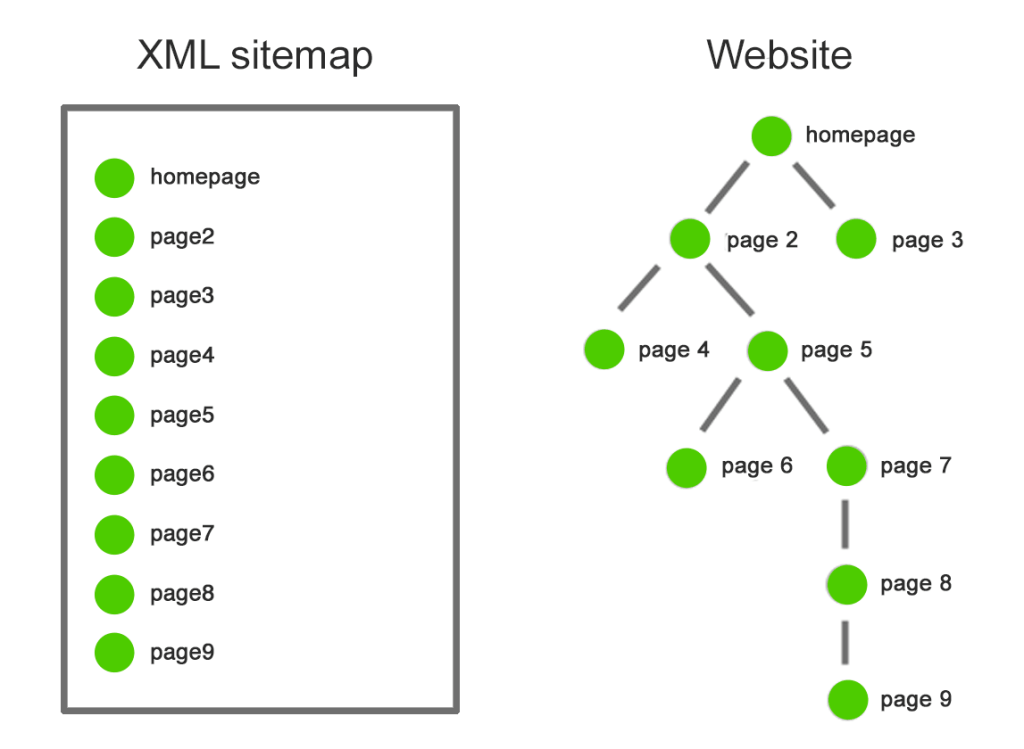
An XML (Extensible Markup Language) Sitemap is a text file which contains all details (URL) about a website.
XML Sitemap has metadata for each URL, which has last updated on, frequency, how important, other versions of URL (various languages). XML Sitemap is acted as a path to inform search engines what content is available and how important to index.
Example Structure:
Sitemap Format:
<?xml version=”1.0” encoding=”UTF-8”>
<urlset xmlns=”http://www.sitemaps.org/schemas/sitemap/0.9”
xmlns:xhtml=”http:www.w3.org/1999/xhtml”>
<url>
<loc>https://www.example.com</loc>
<lastmod>2017-10-06</lastmod>
<changefreq>weekly</changefreq>
<priority>0.9</priority>
<xhtml:link rel=”alternate” hreflang=”en” href=”https://www.example.com”/>
<xhtml:link rel=”alternate” hreflang=”fr”
href=”https://www.example.com/fr”/>
</url>
Why XML Sitemap is needed:
- If your website has 1000 of pages or deep website architecture
- Frequently adding new pages
- Frequently change of content on existing pages
- Facing weak internal link building
Types of XML Sitemaps:
An XML Sitemap is a text file which provides information about URL, Images, Videos listed on the website.
XML Sitemap has limitations, It contains a max of 50,000 URLs and an uncompressed file size limit of 50 MB.
Whenever you exceed a limit, you have to split your URLs across by creating multiple sitemaps. Those sitemaps can link to the main source file of XML Sitemap Index file.
For Eg:
/sitemap-index-products.xml
/sitemap-index-blog.xml
/sitemap-index-categories.xml
Ways To Get Index by Search Engines:
- Submit your Sitemap Index file to google search engine and bing webmaster tool to get index.
- Specify your Sitemap Index file to Robots.txt file as mentioning engines directly to crawl a sitemap.
Various Types of XML Sitemaps:
- XML Image Sitemap
- XML Video Sitemap
- News Sitemap
- Mobile Sitemap
- HTML Sitemap
- Dynamic XML Sitemap
HTML Sitemap:
HTML Sitemaps were designed to access by humans to find URL or Content.
Example of HTML Sitemap:
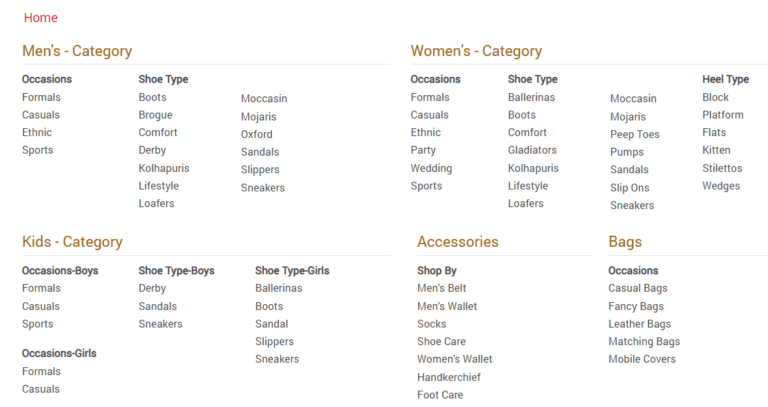
HTML Sitemaps are generally linked in website footers and improve website navigation.
Dynamic XML Sitemap:
A static sitemap is simple, can easily create by using a tool as a sitemap generator or screaming frog for a website.
The problem is you cant keep up to date with new or removed URL on SItemap, Sitemap may become outdated unless you have not manually updated for every single change. So its best to avoid static XML sitemap.
Dynamic XML Sitemap, are automatically gets updated by the server and reflect the website changes as they occur.
To create a Dynamic XML Sitemap:
- Ask the developer to code custom script with clear specifications
- Use a dynamic Sitemap generator tool
- Install a plugin for CMS, YOAST SEO plugin for WordPress
XML Image Sitemap:
Image Sitemaps induce to indexation for image content.
In recent SEO, images and GIfs place an important role in mid of content, So it will crawl along with page URL.
Best practice to use Image Schema Markup to call out image properties to search engines which provides more details than image Sitemap.
XML Video Sitemap:
As similar to Images, videos became more crucial to business for that create and submit XML video sitemap.
Ensure about video schema markup for better crawl and helps video get featured in SERPs.
News Sitemap:
This sitemap is only for news website, which is registered for a google news website.
News sitemaps only contain articles which have published in the last 2 days and cannot contain more than 1000 URLs. Google recommends using Schema.org image or og.image to specify news image thumbnail for google news.
By having news sitemap, it helps article to get featured under the News Section in SERPs.
Mobile Sitemap:
According to John Muller, no need a mobile sitemap for mobile-friendly websites.
If you have designed a formatted version for mobile devices, then mobile sitemap is required for a website.
XML Sitemap Format:
Choose right format of an XML Sitemap.
Some Important Tags:
- Location Tag
- Last Mod Tag
- Change Freq Tag
- Priority Tag
- Href Tag
Location Tag:
You have chosen to include or exclude www of website URL, make sure sitemap has protocol (HTTPs or HTTP).
For an international website, you can implement hreflang tags.
Last Modified Tag:
An optional tag, but highly recommended tag used to communicate with file last mod date and time.
Google uses the metadata of last mod to understand page updated or last changed and help to crawl a page.
Last modified tags, is trying to inform search engines that your content is fresh.
Change Freq Tag:
Change Frequency Tag is an optional tag which passes hint to search engines how frequently content to URL was expected to change.
Muller stated Frequency tag doesn’t really play much of role in sitemap.
Priority Tag:
This tag clearly tells search engines how important the page is compared to other URLs by scaling between 0.0 – 1.0
At last, muller and Illyes have clearly mentioned they ignore priority tags.
XML Sitemap Index Optimization:
Only include relevant pages in an XML sitemap for a search engine to be crawl and not necessarily every page of a website should crawl.
XML sitemap indicates that the listed URL is to be more important than blocked URLs or Not Listed URLs in Sitemap.
What should have to exclude:
- Non-canonical pages
- Duplicate pages
- Paginated pages
- Session ID-based URLs
- Site search result pages
- Reply to comment URLs
- Archive pages
- Server Error Pages
- Pages blocked by Robots.txt
- Pages with no-index
- Resources page (Whitepaper PDFs) lead gen form
- Utility pages (Login page, Contact Page, Privacy policy and account pages etc.,)
By including SEO relevant pages, the search engine can intelligently crawl website and your website can get a better indexation.
Final reminder, an XML sitemap file is just a pathway to knowing what’s important in your website for indexing but overall site quality is a key factor for SEO Optimization.
XML Sitemap Checklist:
XML Sitemap best practices list for a website;
- Include hreflang tags in xml sitemaps
- Include loc and lastmod tags
- Compress XML Sitemap file if file is too large using gzip
- Create Sitemap index file
- Use image, video, news sitemap / schema markup for indexation
- Generate dynamic XML sitemap
- Ensure URLs are included in the single sitemap file
- Submit sitemap to both google and bing tools
- Include SEO relevant pages in XML sitemaps
- Fix all errors and warnings from google search console
- Include sitemap in Robots.txt file
Wind Up:
Here I have done right, XML sitemap helps search engine to easily find website relevant pages for crawl and index website URLs.
In the period of digital marketing, you can practically track and monitor website performance based on various metrics.
Your website needs an XML sitemap not only for formats like priority or frequency, use last modified tag accurately and focus your attention by submitting right URLs.
Make sure to use dynamic XML Sitemap for a website and sitemap index are lastest best practice. Remember sitemap pro checklist before submitting an XML sitemap to search console.
Haven’t created a Sitemap for a website, Create and submit an XML sitemap and gets benefits from Now!
 Digitalnews.video.blog
Leave a comment